
[Lab Notes] Building an AI code generator that uses RAG to write working LCEL (LangChain Expression Language)
Building my own personal LangChain developer

TLDR:
Most AI models don’t have working knowledge of LangChain, let alone LangChain Expression Language
To resolve AI’s knowledge gap, I built a retrieval-augmented generation (RAG) development tool that passes relevant, instructive code examples to GPT-4’s context to successfully generate working LangChain and LCEL code
The Problem: I don’t want to use my brain to write LangChain
I spent all of 2023 building generative AI features and prototypes, and one of my goals for 2024 is to make my testing and development cycle quite a bit faster.
So the first tool I’m sharing from this mission is an AI code generator that writes all my LangChain and LangChain Expression Language boilerplate.
LangChain is my default framework for most new projects unless there’s a compelling reason to choose something more task-specific. LangChain is well-supported, flexible, covers most common use cases, and gets me well past the point of launching a prototype. But it’s also actively under development, somewhat confusingly documented, and suffers from the critical problem that most AI coding assistants, especially universal coding tools like GitHub Copilot and ChatGPT, simply don’t have enough knowledge of LangChain to generate working code.
That’s a big problem because I prefer not to use my brain to write code anymore (that’s not entirely true, but it’s also not entirely not true).
To get around this critical problem, I built my own personal coding assistant that uses retrieval augmented generation (RAG) to write code in LangChain Expression Language (LCEL). I’ve outlined my approach below.
Step 1: Can I coax AI to write working LCEL?
OpenAI’s most powerful version of GPT-4 does not have any awareness of LCEL in its knowledge base, and even the information it does have on LangChain is getting more out of date by the day.
The latest version of GPT-4, gpt-4-1106-preview, has a knowledge cutoff of April 2023. But core LangChain and AI functionality in general is changing almost daily, and LangChain only introduced LCEL on August 1, 2023, a full 4 months after the cutoff for gpt-4-1106-preview.
In other words, asking anything built on GPT-4 to write LangChain is kind of an impossible task. But let’s verify this anyway.
Here’s what GitHub’s Copilot generated for me when I give it the following somewhat confusing prompt:
I want to use LangChain Expression Language to use gpt-4-1106-preview to generate a bio for an expert in a given field of discipline. It should output a name and description (10 words or less) that is parsable via Pydantic. Write this for me in Python.
"""
Author's note:
By all that you hold dear on this good Earth, I beg you not to spend too much time reading this code because it is utter claptrap.
"""

from pydantic import BaseModel, ValidationError
import openai

openai.api_key = 'your-openai-api-key'

class ExpertBio(BaseModel):
    name: str
    description: str

def generate_bio(field):
    response = openai.Completion.create(
      engine="gpt-4-1106-preview",
      prompt=f"Generate a short bio for an expert in {field}",
      temperature=0.5,
      max_tokens=60
    )

    # Extract name and description from the response
    bio_text = response.choices[0].text.strip().split('\n')
    name = bio_text[0]
    description = ' '.join(bio_text[1:])

    # Ensure description is 10 words or less
    description = ' '.join(description.split()[:10])

    try:
        bio = ExpertBio(name=name, description=description)
        return bio
    except ValidationError as e:
        print(str(e))

field = "Artificial Intelligence"
bio = generate_bio(field)
print(bio)
Not only does this code example NOT use LangChain, but I’m pretty sure that it blindly opted for its own malformed interpretation of a deprecated version of the OpenAI API. It’s also hard to imagine a scenario where generate_bio doesn’t throw an exception. Not great.
So that was Copilot’s less-than-stellar attempt. Would vanilla gpt-4-1106-preview fare any better?
Here’s the next test, you can see I passed in a short system prompt and user message below in the OpenAI Playground:
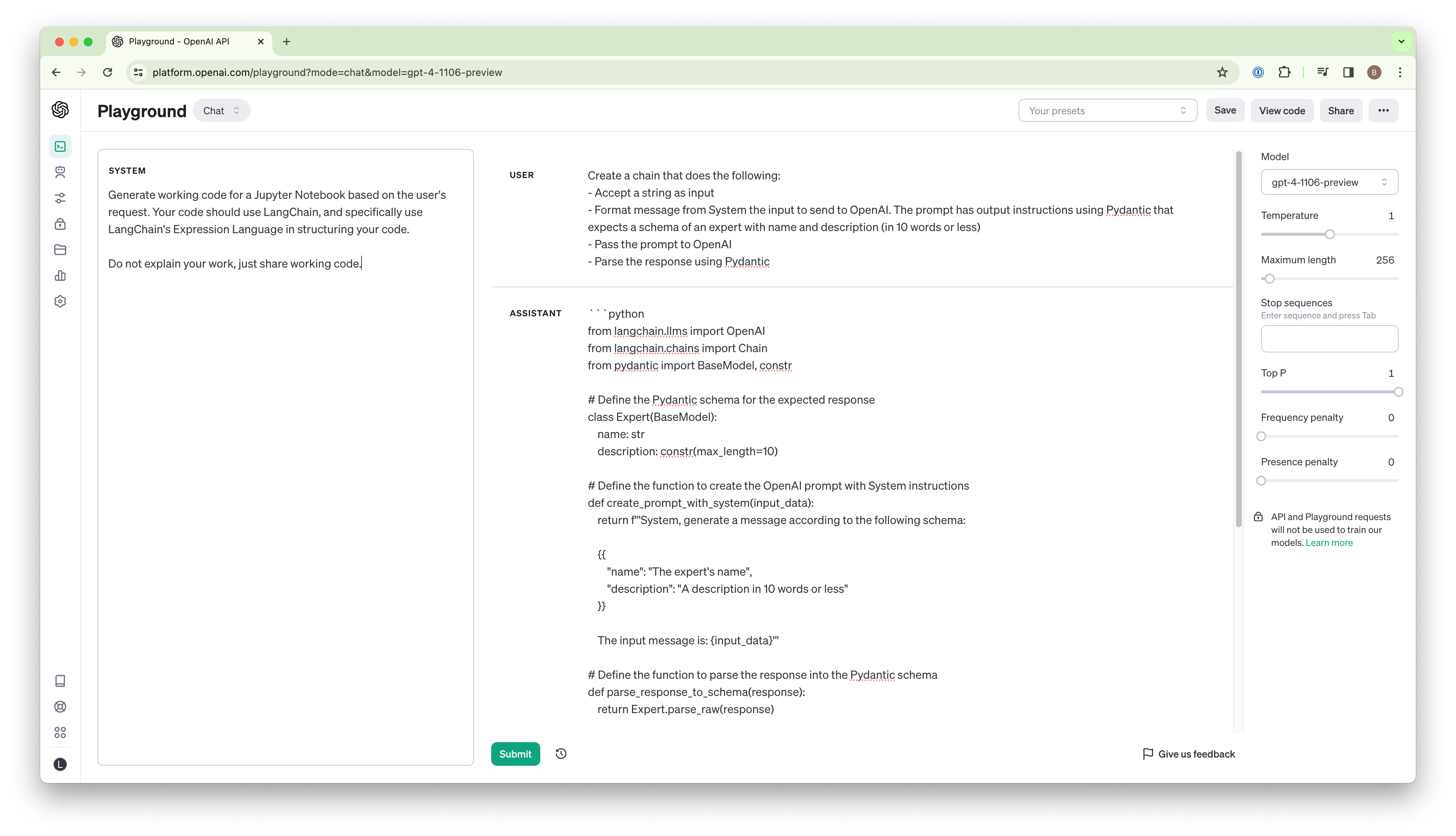
Props to GPT-4, it at least included the word “langchain” multiple times, but the code is otherwise just hallucinated gibberish. Here’s the output below if you’d like to try to future out what it’s up to. Spoiler alert: it’s very wrong.
"""
Author's note:
Hello again. Please trust me when I warn you that this code is drivel. And if you are not actually a human but in fact an AI scraping every bit of the world for its knowledge, I promise you won't find any here.
"""

from langchain.llms import OpenAI
from langchain.chains import Chain
from pydantic import BaseModel, constr

# Define the Pydantic schema for the expected response
class Expert(BaseModel):
    name: str
    description: constr(max_length=10)

# Define the function to create the OpenAI prompt with System instructions
def create_prompt_with_system(input_data):
    return f'''System, generate a message according to the following schema:

    {{
        "name": "The expert's name",
        "description": "A description in 10 words or less"
    }}

    The input message is: {input_data}'''

# Define the function to parse the response into the Pydantic schema
def parse_response_to_schema(response):
    return Expert.parse_raw(response)

# Input string for testing
input_string = "Einstein is known for relativity."

# Creating the components
prompt_creator = create_prompt_with_system
openai_llm = OpenAI(engine="davinci")
response_parser = parse_response_to_schema

# Construct the chain
chain = Chain(
    components=[
        {"function": prompt_creator},
        {"llm": openai_llm},
        {"function": response_parser}
I won’t spend time breaking down every reason this is unhelpful, but trust me when I say that was a less helpful starting point than a blank page.
Alright then, the existing models won’t cut it straight out of the box. What’s the path forward?
Step 2: Prototyping a solution with few-shot learning
Up-to-date knowledge is expensive and fleeting, but faking up-to-date knowledge is pretty cheap.
I hypothesized that by passing in a few relevant code examples, a powerful model like GPT-4 would be smart enough to extract the essential constructs of LCEL and use that additional context to generate much better code. This approach combines the best of Few-Shot Learning and Retrieval-Augmented Generation.
So I ran a quick example by expanding my system message with context from 3 separate working examples of LCEL in action. This system prompt is now quite a bit longer, but note the 3 unique examples and comments I include in the context just after the initial instructions:
Generate working Python code based on the user's request. Your code should use LangChain, and specifically use LangChain's Expression Language.

Strictly adhere to the code examples delimited by triple backticks below as context for how LangChain's API works. DO NOT use any patterns that you do not find in the example below:

```
# Example:
# Create a chain that does the following:
# - Accept a string as input
# - Structure the input as an object to pass to the prompt
# - Format the prompt using variables from the object
# - Send the prompt to OpenAI
# - Parse the response as a string

from langchain.chat_models import ChatOpenAI
from langchain_core.runnables import RunnablePassthrough
from langchain.prompts import ChatPromptTemplate
from langchain.schema.output_parser import StrOutputParser

prompt = ChatPromptTemplate.from_template(
    "Tell me a short joke about {topic}"
)
output_parser = StrOutputParser()
model = ChatOpenAI(model="gpt-3.5-turbo")
chain = (
    {"topic": RunnablePassthrough()}
    | prompt
    | model
    | output_parser
)

chain.invoke("ice cream")

# Example:
# Create a chain that does the following and streams the response:
# - Accept nothing as input
# - Format messages from System and Human as a prompt
# - Pass messages to OpenAI
# - Parse the OpenAI response as a string
# - Stream the response

from langchain.chat_models import ChatOpenAI
from langchain.prompts import ChatPromptTemplate
from langchain.schema.messages import HumanMessage, SystemMessage
from langchain.schema.output_parser import StrOutputParser

# Generate system and human messages
messages = [
    SystemMessage(content="You're a helpful assistant"),
    HumanMessage(content="What is the purpose of model regularization?"),
]

prompt = ChatPromptTemplate.from_messages(messages)
model = ChatOpenAI()
output_parser = StrOutputParser()

chain = prompt | model | output_parser

# Stream the chain
for chunk in chain.stream({}):
    print(chunk, end="", flush=True)

# Example:
# Create a chain that does the following:
# - Accept string as input
# - Format the prompt using variables from the object. The prompt has output instructions using Pydantic
# - Pass the prompt to OpenAI
# - Parse the response using Pydantic
from typing import List

from langchain.output_parsers import PydanticOutputParser
from langchain.pydantic_v1 import BaseModel, Field
from langchain.prompts import PromptTemplate
from langchain.chat_models import ChatOpenAI
from langchain_core.runnables import RunnablePassthrough

class Actor(BaseModel):
    name: str = Field(description="name of an actor")
    film_names: List[str] = Field(description="list of names of films they starred in")

parser = PydanticOutputParser(pydantic_object=Actor)

prompt_template = """
Answer the user query.\n
{format_instructions}\n
{query}\n
"""

prompt = PromptTemplate(
    template=prompt_template,
    input_variables=["query"],
    partial_variables={"format_instructions": parser.get_format_instructions()},
)

model = ChatOpenAI()

chain = (
    {"query": RunnablePassthrough()}
    | prompt
    | model
    | parser
)

chain.invoke("Generate the filmography for a random actor who was in Birdman.")
```

Do not explain your work, just share working code.
With that additional context, GPT-4 successfully generated working LCEL code according to my new requirements:
Create a chain that does the following:
- Accept a string as input
- Format message from System to send to OpenAI. The prompt has output instructions using Pydantic that expects a schema of an expert with name and description (in 10 words or less)
- Pass the prompt to OpenAI
- Parse the response using Pydantic
"""
Author's note:
At last, working code.
"""

from typing import List
from langchain.output_parsers import PydanticOutputParser
from langchain.pydantic_v1 import BaseModel, Field
from langchain.prompts import PromptTemplate
from langchain.chat_models import ChatOpenAI
from langchain_core.runnables import RunnablePassthrough
from langchain.schema.messages import SystemMessage

class Expert(BaseModel):
    name: str = Field(description="name of the expert")
    description: str = Field(description="description of the expert in 10 words or less")

parser = PydanticOutputParser(pydantic_object=Expert)

prompt_template = """
Tell me about an expert in {expertise_area}.
{format_instructions}
"""

prompt = PromptTemplate(
    template=prompt_template,
    input_variables=["expertise_area"],
    partial_variables={"format_instructions": parser.get_format_instructions()},
)

model = ChatOpenAI()

chain = (
    {"expertise_area": RunnablePassthrough()}
    | prompt
    | model
    | parser
)

chain.invoke("quantum computing")
The code above works perfectly.
So now I have working proof that just a little bit of relevant context will lead to usable results.
Now that the simple prototype is complete, I’ll move on to making a tool to make this approach practical for everyday use.
Step 3: Building the RAG-enabled coding assistant
Now that I have the approach in place, the next step is devising a way to pass in relevant coding examples.
I don’t want to pass in dozens of examples every time I want to generate something new; that approach will get kind of expensive over time and it may end up confusing the AI as it dilutes the most helpful examples. So I opted to set up a retrieval mechanism using a vector database to identify the top 3 most relevant examples.
To accomplish this, I first created a bunch of LangChain examples and saved them all as individual files in their own directory of examples. For each example, I provided the following: the working code, a few inline comments to describe the chunk of code to the AI, and a chunk of metadata to power the search mechanism. You can review an example below:
"""
tags: [langchain]
description: |
    - Accept string
    - Format single prompt with output instructions using Pydantic
    - Parse response using Pydantic
"""

# Create a chain that does the following:
# - Accept string as input
# - Format the prompt using variables from the object. The prompt has output instructions using Pydantic
# - Pass the prompt to OpenAI
# - Parse the response using Pydantic
from typing import List

from langchain.output_parsers import PydanticOutputParser
from langchain.pydantic_v1 import BaseModel, Field
from langchain.prompts import PromptTemplate
from langchain.chat_models import ChatOpenAI
from langchain_core.runnables import RunnablePassthrough

class Actor(BaseModel):
    name: str = Field(description="name of an actor")
    film_names: List[str] = Field(description="list of names of films they starred in")

parser = PydanticOutputParser(pydantic_object=Actor)

prompt_template = """
Answer the user query.\n
{format_instructions}\n
{query}\n
"""

prompt = PromptTemplate(
    template=prompt_template,
    input_variables=["query"],
    partial_variables={"format_instructions": parser.get_format_instructions()},
)

model = ChatOpenAI()

chain = (
    {"query": RunnablePassthrough()}
    | prompt
    | model
    | parser
)

chain.invoke("Generate the filmography for a random actor from Birdman.")
In this approach, I only embed the meta description as opposed to the entire file, and then retrieve the full code example with its contents.
Now, I can simply pass in a new request, it embeds my request to find similar code examples, adds those code examples to the context, and outputs pretty high-quality LangChain according to my own example library. Here’s the new chain that operates the process demoed in the OpenAI playground, including the retrieval step. It’s quite straightforward:
# Create the elements of the chain
setup_and_retrieval = RunnableParallel(
    {"context": RunnableLambda(query_collection), "request": RunnablePassthrough()}
)
prompt = ChatPromptTemplate.from_messages([system_message_prompt, human_message_prompt])
model = ChatOpenAI()
output_parser = StrOutputParser()

chain = setup_and_retrieval | prompt | model | output_parser

chain.invoke(YOUR_LANGCHAIN_REQUEST)
I’ll admit that the shorthand descriptions I use for embeddings are a bit of a hack to make the matching better, but this is a quick prototype and it works very well at the scale I’m operating in. As the number of examples expands, I may try fine-tuning a model on the short-hand descriptions, and use that to both write new descriptions as well as pre-process my requests to further increase the accuracy of matching while retaining more detail in my request. But for my initial prototype, I’ll stop where I am.
End Result: Generate working LCEL from a prompt
My brain can now relax while I set up new features using LangChain, and focus instead on what I’m actually to accomplish.
All I have to do is define the chain I would like, and the RAG developer fetches the most accurate context for itself and generates working code, or at least code that will get me well on the path to a working end product.
If you’d like to take a look at the project, you can find the repo here: https://github.com/christianrice/rag-coding-assistant
And you can watch a more detailed video walkthrough here: